In this article, we explain what Azure Databricks is and what its costs and benefits are. Additionally, we provide details on what variables to consider when creating a budget to avoid surprises in billing.
What is Azure Databricks?
Azure Databricks is the Databricks service hosted on the Microsoft Azure cloud. Remember that Databricks is a cloud platform as a service that encompasses many of the tools we need to work with data.
An important thing to keep in mind is that Databricks manages all the necessary infrastructure for its operation for us. While this is transparent to the user or developer, behind the scenes, virtual machines are physically needed to create, run, and terminate clusters (a set of computers that act together as a single entity). This is where cloud providers—such as Microsoft—come into play, hosting the service for us and managing all the infrastructure.
What are the benefits of using Azure Databricks?
1. Microsoft backing
One of the largest cloud providers in the market provides support in terms of service reliability and availability.
2. Security
Azure Databricks is natively integrated with Microsoft Entra ID (formerly Azure Active Directory), one of the most robust identity and access management services. This enhances the security of users accessing the service and allows for auditing all transactions and operations. For example, it enables user authentication to Databricks through their Entra ID account.
3. Integration
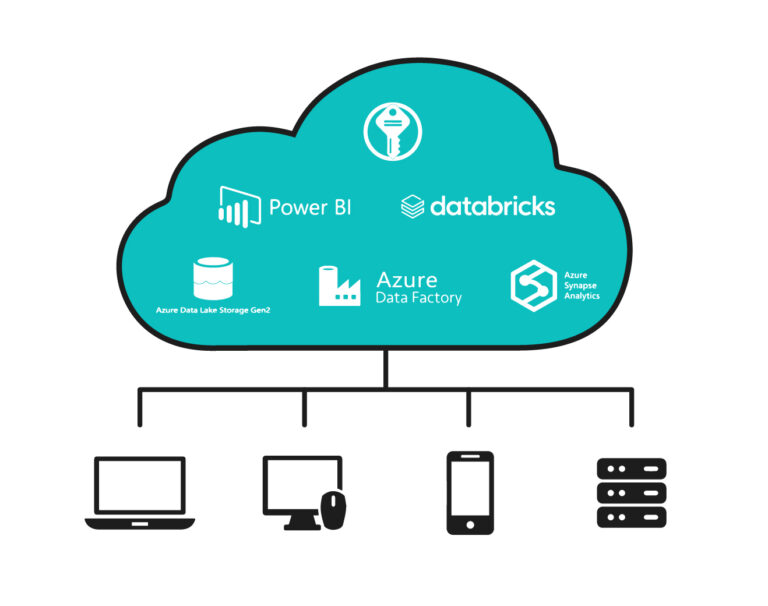
Azure Databricks is highly integrated into the Azure ecosystem. This facilitates the integration of Databricks with other services, such as:
- Azure Key Vault: A secret management service where we can store keys, passwords, and any sensitive values that should not be exposed in the development code. It is accessed directly from Azure Databricks, reading the value and using it for necessary connections without the user being able to know the secret’s value.
- Azure Data Lake Storage Gen2: Azure Databricks allows direct connection to the Azure storage service. Reading and writing to Storage can be done effortlessly.
- Azure Data Factory: It has direct integration with Azure Data Factory (ADF), the Azure orchestration service. This allows Databricks notebooks to be easily executed by invoking them from an ADF pipeline.
- Synapse Analytics: Azure Databricks has a connector to connect to Synapse, allowing easy reading of the data stored there.
PowerBI: It can easily connect to Azure Databricks. It only needs to be configured as an additional data source and the corresponding credentials passed. Then, it is possible to import data or run queries, and security management is also straightforward through Microsoft Entra ID.
How to start using Azure Databricks?
Starting to use Azure Databricks is very simple; you only need an Azure account and to create the service from the portal. This link provides a step-by-step guide to get started.
It is important to note that bringing Azure Databricks into a production environment may involve a series of additional configurations. Especially in terms of managing security and user permissions, configuring secrets or parameters, and connecting to external sources (such as the Azure Data Lake Storage Gen2 service).
What is the cost of Azure Databricks?
Azure Databricks operates in the cloud, so it does not require a large initial investment. It is a service with no fixed costs; you only pay for the cluster usage time. Therefore, it is a good alternative to start with if you have a small data project, as the cost will scale as more processes are added.
If you are new to Azure cloud, you can access a USD 200 credit to start working at no additional cost, plus one year in which some services will be completely free. This is usually enough to explore the main services and to conduct some data ingestion and processing tests.
For more information about these credits, you can consult here.
We also recommend setting up alerts within Azure, where we can define the desired budget. This way, we’ll receive notifications if the threshold is exceeded and have access to a cost management service where we can observe in detail which services have consumed our budget.
Now, what is the exact cost of using Azure Databricks?
As explained, you are charged per hour that the cluster is running, but there are several factors to determine this cost. To get an idea, we can start working with small clusters that consume less than USD 0.5 per hour, up to very large clusters that can cost over USD 100 per hour.
What factors determine the price of Azure Databricks?
The exact price we will pay will mainly depend on four factors:
1. Cluster type
We can mainly differentiate clusters into two main types:
- Interactive (or All-Purpose Compute): This is a cluster that the user must create beforehand. It is turned on-demand and will remain on until turned off. It’s recommended to configure automatic shutdown after a certain period of inactivity. This cluster is ideal for tasks such as developing new code, exploratory data analysis, or analytical queries.
- Job-cluster (or Jobs Compute): This is a type of cluster used for the execution of a specific notebook. In this case, Databricks manages the creation and deletion of the cluster entirely once the notebook execution is finished, so there’s no need to worry about shutting it down afterward. This type of cluster is recommended by Databricks for running processes in production environments that will be repeated frequently or called from a pipeline. Job-clusters are cheaper than interactive ones, usually costing less than 50% of the former.
2. Instance size
When creating the cluster, it will be provisioned with instances, which are essentially the hardware on which our cluster will run. This hardware varies depending on the chosen instance, and three factors should be considered: RAM, hard disk, and processor.
As expected, the more resources the instance contains, the higher the cost per hour will be.
The value of each of these factors is not considered individually. Azure Databricks uses a cost unit called “DBU,” which combines the three factors into a single unit. The important thing to know is that the more hardware our cluster has, the higher the DBU per hour value we will be paying.
3. Virtual machines
It’s important to consider that in addition to “DBUs,” for all instances that are not Serverless, there is also a cost associated with the Azure virtual machines needed to run our cluster. These virtual machines have their own resource group and are managed by Databricks, which generates them when the cluster is turned on. The cost of virtual machines is also associated with hardware needs; the larger the instance size, the higher the cost of virtual machines.
4. Number of instances
Just as we can select the size, we can also select how many instances we want our cluster to contain, determining the number of nodes. We can start with small clusters of a single node and scale as needed.
5. Geographic region
In addition to the previous considerations, Azure Databricks has a cost according to the region where the cluster is generated, as it has locations around the world, and these will have a higher or lower cost depending on the scale of Azure infrastructure in that region. For example, if we are working from South America, a small instance in “Brazil South” would cost us USD 0.642/hour, while the same instance in “US East” would cost us USD 0.756/hour. Keep in mind that the choice of geographic region will also depend on the location of the data source and destination, as this will also impact the latency and costs of data transmission over the internet. If the databases we are going to connect to are in Europe, it is probably convenient to look for an instance from that area to reduce latency.
If you are interested in knowing more about the service’s cost in detail, you can consult the following link.
Conclusion
At Datalytics, we are a Solutions Partner in Data & AI at Microsoft and certified partners in Databricks, covering all competencies related to working with data. Based on all our experience with this technology, we can conclude that Azure Databricks is a platform that has been widely talked about in recent years and continues to grow steadily. Therefore, it is important to know what it is for anyone working or interested in the world of data.
As explained, taking the first steps in Databricks and the Azure environment is simple, and we will have the initial cost waived. Therefore, we encourage those who are interested to take their first steps and try this technology. After all, there is no better way to learn than by doing.
—
This article was originally written in Spanish and translated into English by ChatGPT.
—
* This content was originally published on Datalytics.com. Datalytics and Lovelytics merged in January 2025.