I’ve always found web scraping interesting, there’s a massive trove of data available to us in a wide array of formats- it presents the perfect ‘big data’ problem, how can we capture, ingest, analyze, and leverage this data?
To keep things relevant for a broader audience, I’m going to focus on the capture and ingest portions of the question.
Introduction to Web Scraping
In its simplest form, web scraping is the act of collecting data from a webpage. A basic example of this would be taking the HTML content for a page and parsing through the text with the help of a tool such as Beautiful Soup 4. This works great for simpler pages, or situations where the data you need will be easily available in the pages HTML structure. Where we run into issues with BS4 is interacting with web pages, and retrieving data that would be rendered in the browser, additionally, when it comes to dynamically generated content things can get tricky.
This is where Selenium comes into play. It allows you to programmatically control a chrome instance, enabling developers to send inputs to a web page, retrieve data from objects, and implement more advanced web-scraping tools. It can also be run in a headless environment (e.g. an EC2 instance).
Reference Architecture
I’m a huge proponent of the Lakehouse, particularly for a use case such as web scraping, where we could potentially see a variety of structured, semi-structured, and unstructured data.
For example, let’s say we want to build a data pipeline that aggregates available vehicles for sale across different platforms. Think about some of the attributes we might want to capture: year, make, model, odometers/hours, descriptions, photos, etc.
I’ve built a reference architecture to visualize what this could look like in a Lakehouse implementation leveraging AWS, EC2, S3, and Databricks (Autoloader will come in handy here).
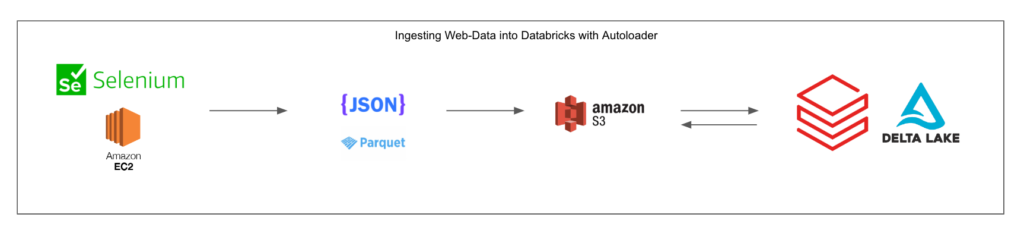
After we’ve identified the specific data we’re collecting and have written our selenium scripts (Selenium has support for Python, C#, Java, Ruby, JS, or Kotlin) we’ll deploy to an EC2 instance. In this example, we’re storing our data in a JSON or Parquet format, but the flexibility of cloud object storage allows for a variety of options here.
Ultimately, we need to land the data in cloud object storage (S3 in this case). From here, we can take advantage of Databricks Autoloader and Structured Streaming. This will allow us to have an ingest pipeline that’s always listening for changes to our S3 directory, and pulling in new data as it populates (to be further processed downstream). This could also be done with regular batch processes, but for a use-case like ours, having the latest data is important.
This is a robust and powerful approach that allows for the collection of significant amounts of web data where an API may not exist, or we don’t have access to it. It’s a scalable, cloud-based solution, and could also be developed on Azure, or GCP- as well as AWS.
Implementation
Disclaimer: This section will include code snippets to help illustrate key concepts, but may omit some boilerplate and configuration specifics. An intermediate understanding of Python and SQL is assumed. For more information please reference the following documentation:
For this example, we are going to use Selenium to launch a chrome instance, open Craigslist, and output all of the listing links on the page to a JSON file. This example will output a JSON file in the same directory that the script is run from. Later on we’ll configure this to write to S3.
#IMPORTS
from selenium import webdriver
from selenium.webdriver.chrome.service import Service
from webdriver_manager.chrome import ChromeDriverManager
from selenium.webdriver.chrome.options import Options
from selenium.webdriver.common.by import By
from selenium.webdriver.common.keys import Keys
from selenium.webdriver.common.action_chains import ActionChains
import json
#INITIALIZE BROWSER DRIVER
def launchBrowser():
chrome_options = Options()
chrome_options.binary_location=”../Google Chrome”
chrome_options.add_argument(“start-maximized”);
driver = webdriver.Chrome(service=Service(ChromeDriverManager().install()))
driver.get(‘https://sarasota.craigslist.org/search/cta?purveyor=owner’)
driver.title #=> “Google”
driver.implicitly_wait(5)
return driver
driver = launchBrowser()
print(‘Webdriver launched’)
#CREATE AN EMPTY LIST TO STORE LINKS
link_list = []
#FIND ALL ELEMENTS BY CLASS NAME
results = driver.find_elements(By.CLASS_NAME, ‘result-row’)
#LOOP THROUGH ELEMENTS AND APPEND LINK TO LIST
for r in results:
li = r.find_element(By.TAG_NAME, ‘a’)
append_data = li.get_attribute(‘href’)
link_list.append(append_data)
#CONVERT LIST TO A DICT
data = {‘link:’ : link_list}
#WRITE DICT TO JSON AND SAVE FILE
with open(‘data.json’, ‘w’) as f:
json.dump(data, f)
driver.quit()
A couple of things to note here:
- We’re using the webdriver_manager package, which will install a compatible version of chromedriver when the script is run. This is the easiest way to get a Selenium script up and running, but you may want to do a static install and point the driver to the install path when configuring on EC2 or other cloud compute resources.
- When running the script on a cloud server configure chrome to run in headless mode with the following option:
- o chrome_options.addArguments(“–headless”);
- Ensure that Selenium and webdriver_manager are installed (available through pip)
Configuring our script to write to an S3 bucket
Currently, we have a basic script that scrapes some data from Craigslist and writes a local JSON file. This is great, but if we run it on an EC2 instance our JSON data will be stuck in EC2! We need to move it to S3 so that Databricks Autoloader can pick it up and trigger an ingest pipeline. For this, we’ll be using a package called Boto3, also known as the AWS SDK for Python.
From the Boto3 documentation:
You use the AWS SDK for Python (Boto3) to create, configure, and manage AWS services, such as Amazon Elastic Compute Cloud (Amazon EC2) and Amazon Simple Storage Service (Amazon S3). The SDK provides an object-oriented API as well as low-level access to AWS services.
Learn more about Boto 3, including installation and configuration instructions, here.
After configuring our EC2 instance to run Selenium, setting up and configuring Boto3, and ensuring our permissions are correct (Our EC2 instance should have access to write to the target S3 bucket) we can replace our previous JSON dump with the following:
import boto3
s3 = boto3.client(‘s3’)
s3.put_object(
Body=str(json.dumps(data))
Bucket=’your_bucket_name’
Key=’your_key_here’)
This will write the JSON data directly to S3! From here, we can move over to Databricks, and configure Autoloader to track the S3 bucket for new data.
Leveraging Autoloader to Ingest JSON Data into Databricks
Landing our data in S3 is great, but we’re only halfway there. We need to ingest our JSON data into a Databricks environment and write it to a delta table for further processing, cleanup, and visualization/ML use cases! This is where Autoloader comes in.
From the Databricks documentation:
Auto Loader incrementally and efficiently processes new data files as they arrive in cloud storage. Auto Loader can load data files from AWS S3 (s3://), Azure Data Lake Storage Gen2 (ADLS Gen2, abfss://), Google Cloud Storage (GCS, gs://), Azure Blob Storage (wasbs://), ADLS Gen1 (adl://), and Databricks File System (DBFS, dbfs:/). Auto Loader can ingest JSON, CSV, PARQUET, AVRO, ORC, TEXT, and BINARYFILE file formats.
A good starting configuration for Autoloader is as follows (Python, for Scala implementation please refer to Documentation) Simply fill in the path to your cloud storage, schema location, checkpoint location, as well as the target write location for the output stream:
spark.readStream.format(“cloudFiles”)
.option(“cloudFiles.format”, “json”)
.option(“cloudFiles.schemaLocation”, “”)
.load(“”)
.writeStream
.option(“mergeSchema”, “true”)
.option(“checkpointLocation”, “”)
.start(“<path_to_target”)
Important Callout:
When it comes time to move one of these pipelines to production, some thought needs to go into the data freshness requirements. In order for Autoloader to continuously listen and for and ingest new data the cluster will always be running- accumulating DBU costs as well as cloud compute costs. If the data can be processed in batches you can reduce costs.
To reduce compute costs, Databricks recommends using Databricks Jobs to schedule Auto Loader as batch jobs using Trigger.AvailableNow (in Databricks Runtime 10.1 and later) or Trigger.Once instead of running it continuously as long as you don’t have low latency requirements.
Further Reading:
- What is Autoloader?
- Using Autoloader in Delta Live Tables
Recap and Next Steps:
Now that we can access our data in the Databricks Lakehouse environment, the world is our oyster! There’s a lot that can be done to expand off of the simple use case I demonstrated.
For example, we can build another Selenium script that uses the Python Databricks API Connector to directly query the data we ingested (list of Craigslist postings), navigate to each posting, grab all of the data and replicate the process to ingest that data into our environment.
We can also transform, enrich, filter, and aggregate our data across the medallion architecture to serve various stakeholders (Data Science/ML teams, Business Analysts, etc).
To learn more about how I and Lovelytics help clients do more with their data, please visit us at https://lovelytics.com/or connect with us by email at [email protected].